 Gigglewagon
Turn the mobile app into the campfire.
One mobile app, the whole family huddled round it. Short, silly games where a 4-year-old and a grandparent laugh at the same joke, and everyone has a fair shot at winning.
No ads, ever. Not in the free version, not in Plus, not between rounds.
Make your own family games. Quiz decks about your family, a road trip or a party, built on the web and in the app. See how
Play online in your browser too: a grown-up signs in with an account. Children never get one.


Make your own family games
Quiz decks about your family, your road trip, school or a party. Build them on the web and in the app, then everyone plays.
- Write your own questions and answers, or import a JSON or CSV file.
- Pick a shape and an icon for every deck.
- Share a game as a file with another family.
- Play in the mobile app, or send it to the TV for the whole room.
- Games you make on the web sync to your account on their own. Games made in the app stay on the device until you choose to sync them.
- Your words stay exactly as you wrote them and are never translated.
Create your games on the webSign in
Custom games are part of Plus. An account is optional and for grown-ups only.


A grown-up opens the mobile app. Everyone plays.
No logins for kids, no menus to fight over. The adult reads, judges and taps; the family does the laughing.
- 01
Say who’s playing
Pick an age band for each player, from Sprouts (4 to 5) to Grown-ups. No names, photos or birthdays needed.
- 02
Pick a room
Home shows every game. Tap a room pill (Car, Table, Bedtime or Waiting) to see the games that suit it.
- 03
Play a short round
Each player gets a prompt at their level. Little ones get pictures and audio, older ones get harder twists, quietly, so nobody feels singled out.
- 04
Stop on a high
Rounds end with a warm “great game” and a natural place to stop. No streaks, no energy bars, no nagging to keep going.
Games that everyone can win
Six games, each a card in the deck: talk games are hearts, think games diamonds, make games clubs and spot games spades. Each one practises a real skill without anyone noticing.
- AFreeSpot
I Spy Plus
The classic, with picture prompts for non-readers and sneaky extra rules for the big kids.
- Ages 4+
- Car, Table, Waiting
- Observation
- 2PlusMake
Act It Out
Silent charades. The actor sees the prompt, everyone else shouts guesses.
- Ages 4+
- Table, Waiting
- Creativity
- 3PlusTalk
Story Chain
Build a silly story together, one sentence and one secret word at a time.
- Ages 4+
- All four rooms
- Vocabulary
- 4PlusThink
Brain Duel
Head-to-head maths and riddles, with a hidden head start so a 6-year-old can beat a grown-up.
- Ages 4+
- Car, Table, Waiting
- Maths, logic
- 5FreeTalk
Would You Rather: Kind Edition
Big, funny choices that start real conversations, never mean ones.
- Ages 4+
- Table, Bedtime, Waiting
- Kindness
- 6PlusSpot
Road Bingo
Spot plates, signs and landmarks out of the window. Honour system, no GPS or camera.
- Ages 4+
- Car, Table
- Letters
I Spy Plus and Would You Rather are free for good, and a Game of the day lets you try a different Plus game each day. Every game and every card comes in English, Español, Deutsch, Bahasa Indonesia and हिन्दी.
Take it to the big screen
Race to unscramble words, play on the TV with every mobile app joining in, and keep Plus when you switch devices. Word Unscramble is part of Plus.
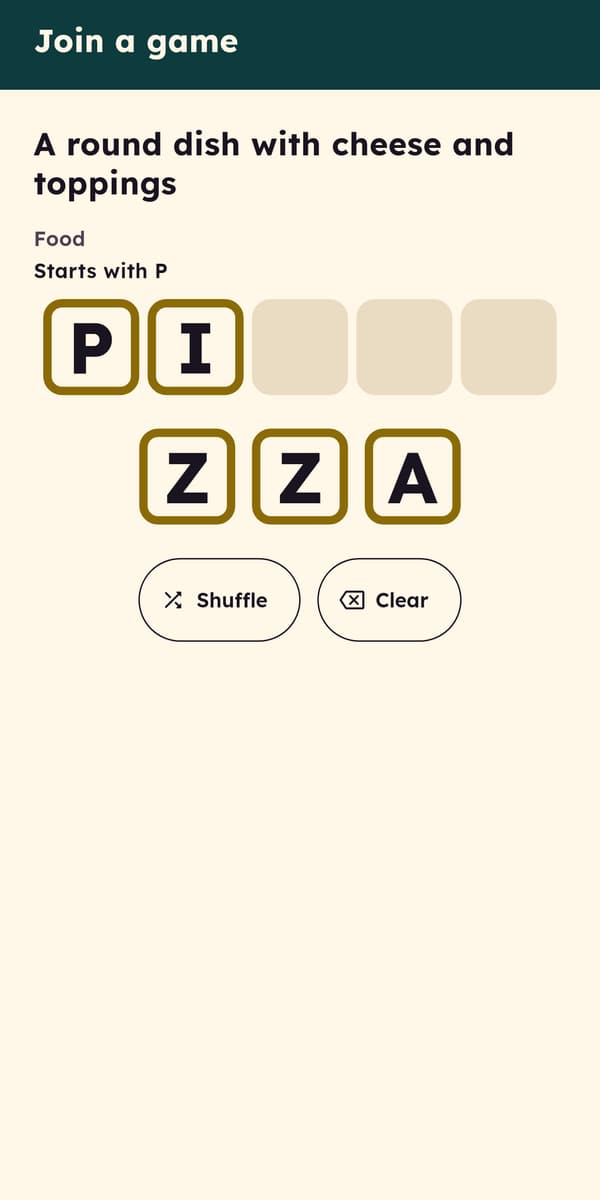
Word UnscrambleRebuild the word from letter tiles in the mobile app, with a Shuffle button and no keyboard. Played on the TV with the mobile app as the controller, in English whatever language the app speaks. 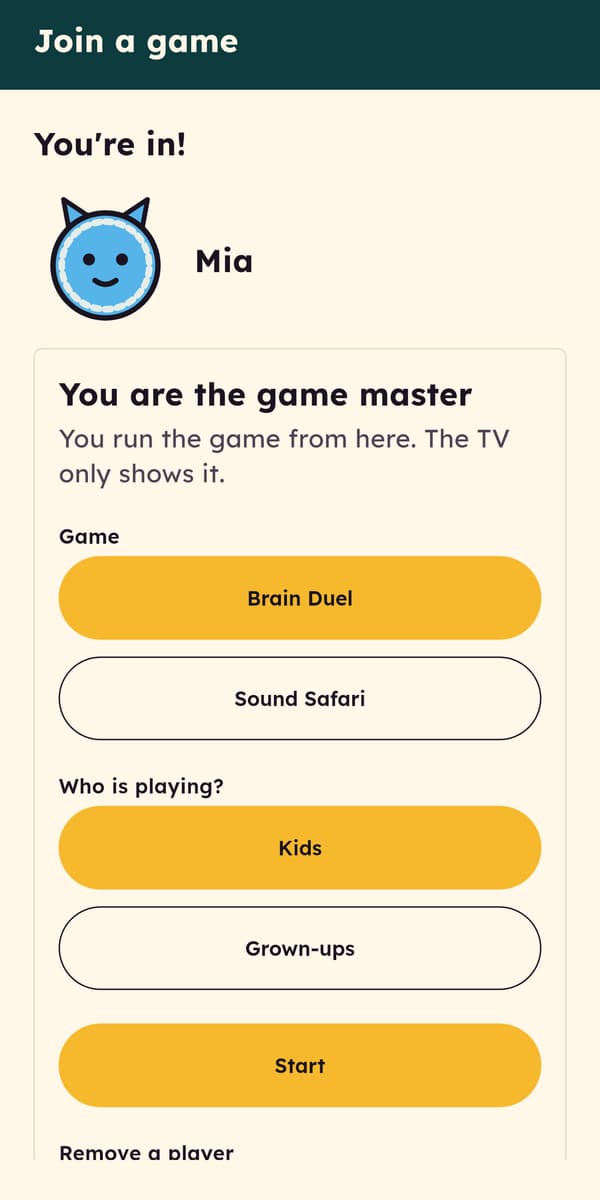
The mobile app joins the TVOn Android TV and Google TV the family joins with the mobile app on their own devices over the home Wi-Fi, scanning the TV’s code. One player’s mobile app is the game master and runs the game, and a spare tablet can keep the scoreboard. 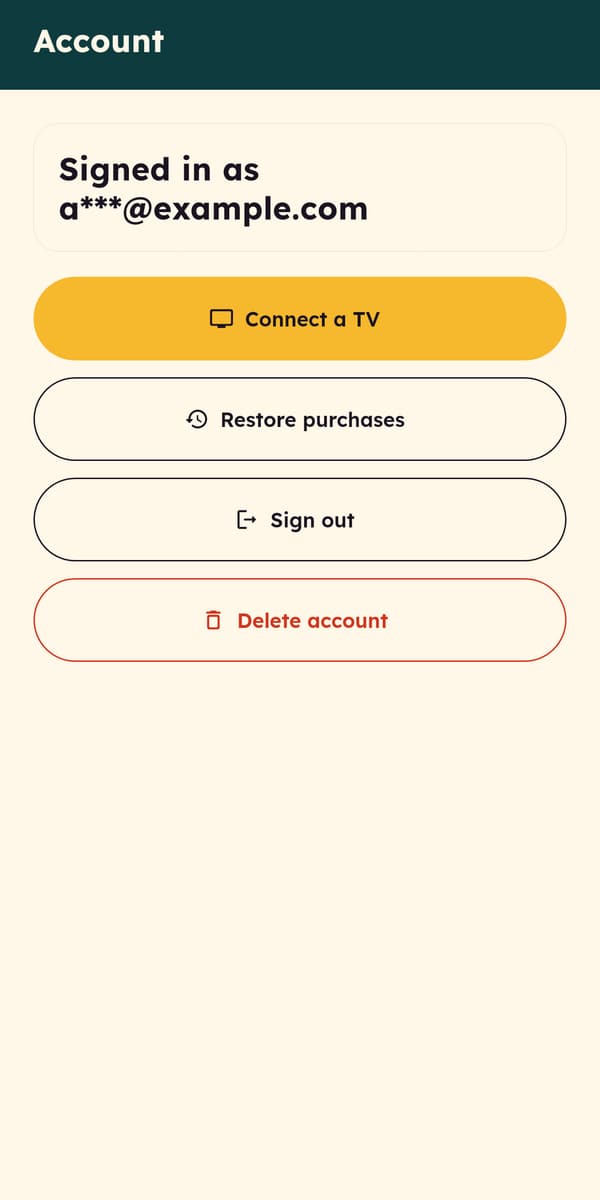
An optional grown-up accountAdults can sign in with Apple on iPhone, Google on Android or an emailed link, to keep Plus and synced decks when they switch devices. Never for children, and never needed to play: there are still no child accounts.


Play together, even from far away
Join an official live game night, or host your own. Hosting is part of Plus; joining is free.
- 01
Pick a game
A grown-up with Plus starts a live session, picks a game or one of their own quiz decks, and chooses how many players, from 2 to 100.
- 02
Share a short code
Players join with a six-character code or link, in the app or in a web browser. No account needed: everyone gets a made-up name, or picks their own.
- 03
Stay in charge
The host can lock the room or remove a player. There is no chat, and a session ends when the host ends it.
- 04
Family Quiz Show
Everyone answers in secret, with lifelines and a big finale: brain, true-or-false, picture and lightning rounds.
Same game, the right level for everyone
Real screens from the mobile app, passed round the family.
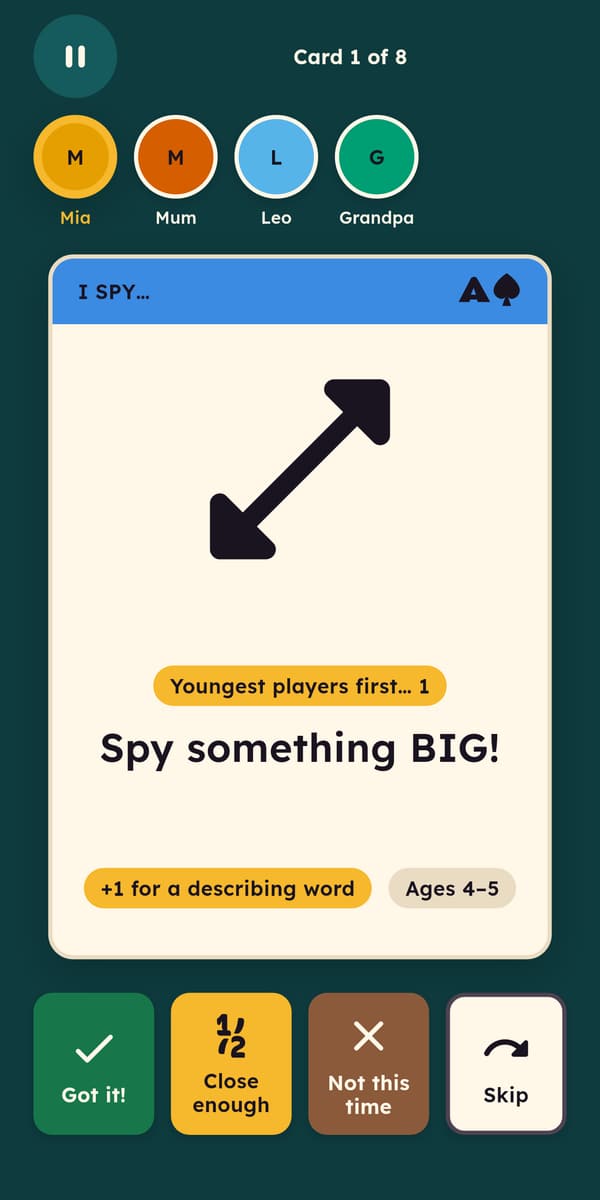
Pictures first for little onesI Spy Plus in Sprout mode: big pictures and read-aloud cards for children who can’t read yet. 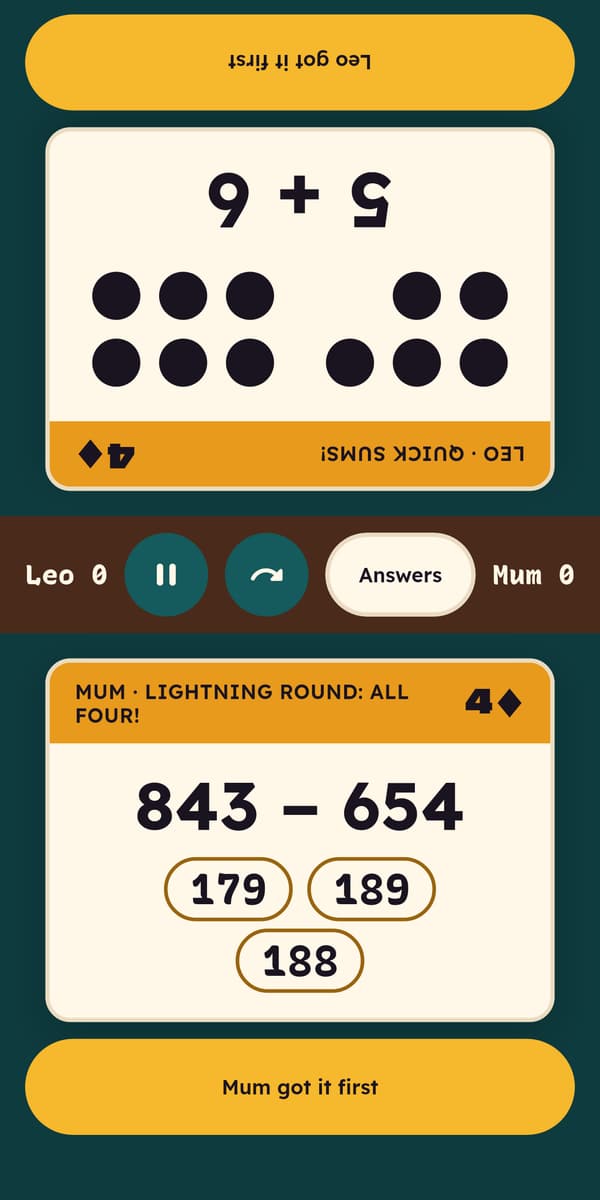
Fair for every ageBrain Duel, face to face in one mobile app: dots to count for a 6-year-old, mental maths for a grown-up. 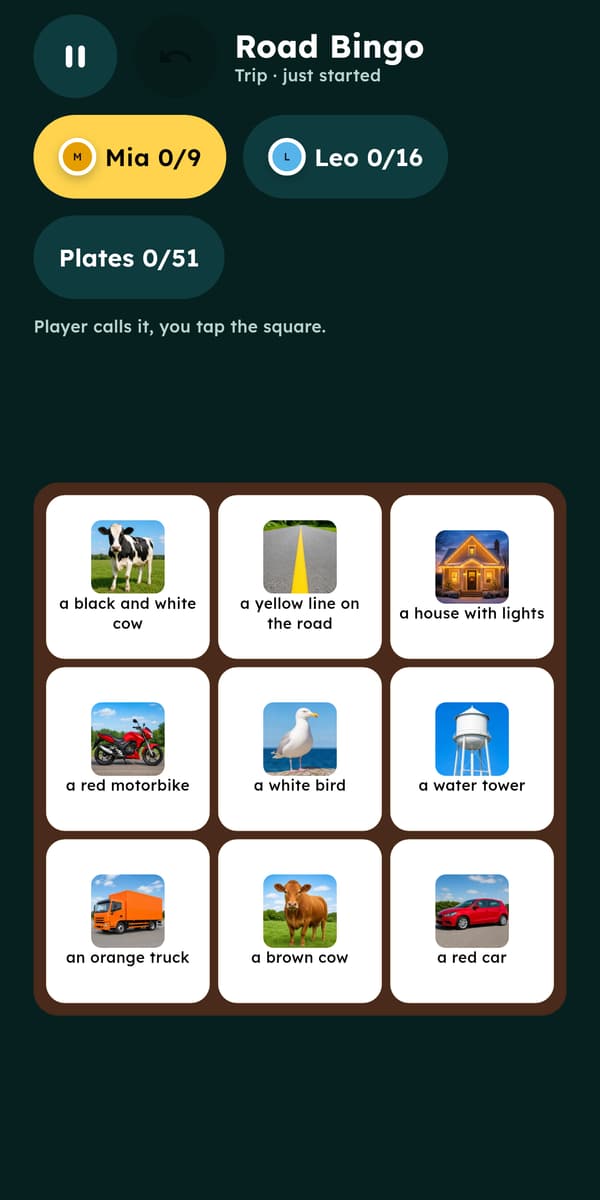
Road trips, sortedRoad Bingo for passengers: spot things out of the window and mark them off. Plays offline.


Four rooms, each with its own games
Home has a pill for each room. Tap one and the app shows the games that suit it.
Car
Window games and a big, high-contrast car mode for passengers. Plays fully offline, and the driver never plays.
Table
Party and conversation games that get everyone talking at dinner, from the shyest kid to the grumpiest teen.
Bedtime
A dim, calm mode with quiet stories and gentle wind-down rounds. No countdowns, no flashing.
Waiting
Quick games for the doctor’s office, a restaurant or the airport gate.
Nothing about your child ever leaves the device.
Gigglewagon is built for families, so the rules are strict and written into the product, not bolted on.

- No child accounts, logins or profiles. Players are age bands, not people.
- No children’s names, photos, voices or birthdays collected. Audio and drawings stay on the device.
- No ads, ever, and no ad trackers. Your family is never the product.
- No chat. Names are random unless a player picks their own short one. Online play happens only in a live session that a grown-up starts and shares a code for.
- Games on a TV run over your home Wi-Fi: the mobile app talks to the TV in the room, not through our servers.
- A grown-up account is optional and never needed to play. Children never get one.
- No GPS or location data. The camera only scans a TV’s join code, and nothing it sees is stored or sent. Road Bingo works on the honour system.
- Purchases and settings sit behind a parental gate. Kids never see a buy button.
- Every prompt is checked by a person before it ships. No AI-generated content at play time.
Free to play. Plus when you want the whole deck.
No ads, ever, on any plan. The free version is genuinely free, and Plus simply opens up the rest of the deck. Purchases are made by a grown-up, behind a parental gate, so children never see a price or a buy button.
-
Free
$0- Two games free for good: I Spy and Would You Rather
- A Game of the day: a different Plus game to try each day
- Starter decks for every game you can play
- No ads, ever
-
Gigglewagon Plus
- Every game and every deck
- Offline packs to download before a trip
- No ads, ever
- Weekly$1.99per week
- Monthly$5.99per month, 7-day free trial
- Annual$44.99per year, 7-day free trial, the best value
- Lifetime$99.99pay once, keep Plus for good
-
Day pass
$0.99- Everything in Plus for 24 hours
- One purchase that never renews, ideal for a road trip or a rainy day
US prices in US dollars, may vary by region and store. Subscriptions are managed by the App Store or Google Play and can be cancelled at any time in your account settings; cancel during a free trial and you won’t be charged.
Questions grown-ups ask
When can we download it?
Gigglewagon is out now on the App Store for iPhone and iPad, and on Google Play for Android, with an Android TV version in the same listing.
What ages is it for?
From 4 years old to grandparents. Each player picks an age band, and the prompts adapt so a non-reader and a teenager can play the same round.
How can a 4-year-old beat a grown-up?
Every game has a quiet handicap. Younger players get easier prompts, picture hints or more time, and nobody can see who got help. The aim is that the youngest player wins a fair share of games.
Does it need the internet?
No. Once installed, the games play offline, which makes them ideal for road trips and flights. Going online only fetches new cards.
Do my kids need an account?
No. There are no child accounts at all, and Gigglewagon never asks for children’s names, photos, voices or birthdays. See the privacy policy.
Are there ads?
No ads, ever. Not in the free games, not in Plus and not between rounds. Gigglewagon is paid for by families who choose Plus, so there is nothing to sell to advertisers and no ad trackers in the app.
What’s free, and what does Plus add?
Free includes two games for good, I Spy and Would You Rather, plus a Game of the day that lets you try a different Plus game each day, all with starter decks. Gigglewagon Plus unlocks every game and every deck, and lets you download offline packs before a trip. When the free cards run out, a grown-up can unlock Plus behind the parental gate and the same round carries on. A day pass gives you everything in Plus for 24 hours. See pricing.
Can my child buy something by accident?
No. Purchases and settings sit behind a parental gate, so only a grown-up can reach them. If a child starts a locked game, the app simply asks them to fetch a grown-up.
Can we play with people in other places?
Yes. With Plus, a grown-up can host a live session: pick a game, share a six-character code, and up to 100 players join for free in the app or in a web browser, with no account. Everyone gets a made-up name, there is no chat, and the host can lock the room or remove a player. Answers pass through our servers only while the session runs and are deleted when it ends. See the privacy policy.
What is the Family Quiz Show?
A game show for the whole table: every question goes to everyone, each player answers in secret, and every answer is scored, with lifelines and a big finale. It has brain, true-or-false, picture and lightning rounds.
Can we play on the TV?
Yes, on Android TV and Google TV. The TV shows the game and the family joins with the mobile app on their own devices on the same Wi-Fi by scanning the TV’s code. One player’s mobile app is the game master and runs the game. Games on a TV run over your home network, not through our servers.
Can we make our own games?
Yes, with Plus. Write the questions on the web or in the app, or import a JSON or CSV file, then play in the mobile app or send the deck to the TV. Games you make on the web sync to your account on their own. Your questions stay exactly as you wrote them and are never translated.
Do I need an account?
No. Accounts are optional and for grown-ups only: sign in with Apple on iPhone, Google on Android or an emailed link to keep Plus and synced decks when you switch devices. Children never get an account.
Which languages does it speak?
Five: English, Español, Deutsch, Bahasa Indonesia and हिन्दी. Every game and every card comes in all five, and so does this site.
Can the driver play?
No. Gigglewagon is played by passengers. Every time you choose the Car room, the app asks who is holding the device and blocks play for the driver.
How do I get help?
Email gw@
